

Money
Refunds
Issuing a full or partial refund, how online and COD refunds differ, what a refund does to your wallet, and what to tell the buyer about timing.
Sometimes money has to go back — a cancelled order, a return, a wrong item. How that works depends on how the buyer paid, and on one thing that surprises most sellers: you request a refund, you do not execute one.
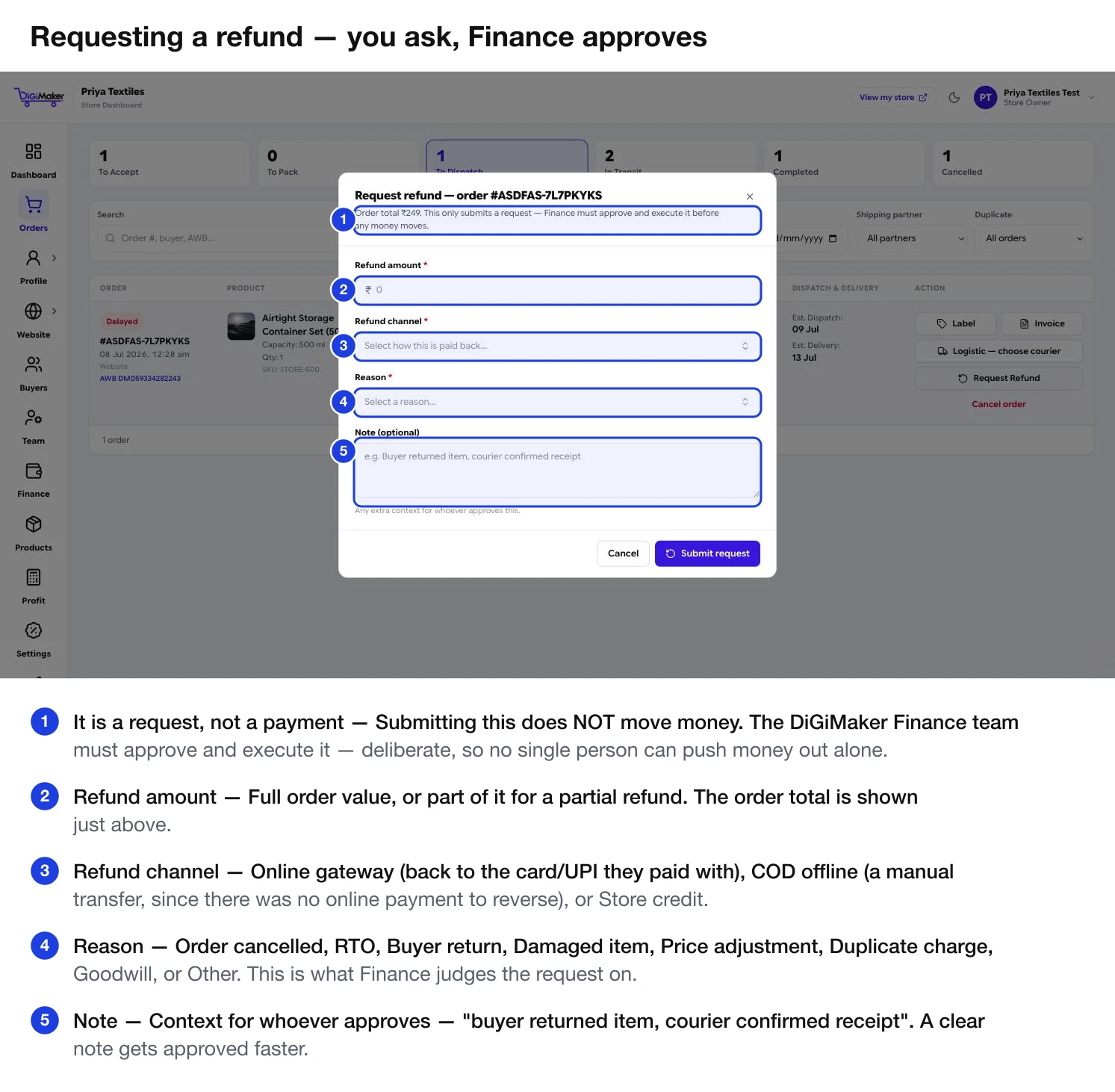
Raising the request
| Field | What to enter |
|---|---|
| Refund amount | The full order value, or part of it for a partial refund. |
| Refund channel | Online gateway (back to the card or UPI they paid with), COD offline (a manual transfer — there was no online payment to reverse), or Store credit. |
| Reason | Order cancelled · RTO · Buyer return · Damaged item · Price adjustment · Duplicate charge · Goodwill · Other. |
| Note | Context for the approver — “buyer returned item, courier confirmed receipt”. A clear note gets approved faster. |
A request then moves through requested → approved → processing → processed. It can also be rejected, or failed if the transfer itself does not go through.
Your refund rules
Set on Bank & payment details, and they drive both the order flow and your storefront’s policy pages:
- Refund Allowed — whether you refund at all.
- Refund Processing Days — how long you take. Be honest; buyers hold you to this number.
- Return Shipping Charge Rule — who pays the courier when goods come back.
- Online Refund Handled By — who processes refunds on prepaid orders.
- COD Refund Handled By — who processes them on cash orders.
Your Refund Mode and return window come from Business & GST details.
Online payments versus COD
The money went to your account through Razorpay, so the refund reverses back down the same path to the card, UPI ID or bank account they paid from.
- The buyer does not choose where it goes — it returns to the original method. That is a rule of the payment networks, not a DiGiMaker choice.
- Typically a few working days to appear on their statement.
- Your wallet shows the adjustment.
Trickier, because the cash went buyer → courier → DiGiMaker → your wallet. There is no original card to send it back to.
- The buyer’s bank or UPI details are needed to return the money.
- The COD Refund Handled By setting decides who processes it.
- It takes longer than an online refund. Say so upfront rather than letting the buyer discover it.
Cancelling is not refunding
Cancelling an order marks it Cancelled and restocks the items — it does not send money back. If the buyer already paid online, raise a refund request as well. See Working an order.
Full and partial refunds
- Full refund — the whole order value. Standard for a return, a cancellation, or a wrong item sent.
- Partial refund — part of it. Used when one item in a multi-item order came back, or you have agreed a goodwill discount for something minor rather than taking the whole thing back.
What it does to your wallet
Every refund shows in your wallet statement with a date and amount, so the numbers always reconcile.
Talking to the buyer
Confirm the request is raised
The uncertainty is what makes people angry, not the wait. Say it is raised and being approved — do not promise it has already been sent.
Tell them the realistic timeline
Use your actual Refund Processing Days plus the bank’s own time. Under-promise.
Tell them where it is going
“Back to the UPI you paid from” or “to the bank account you gave us” — so they know what to watch.
Confirm when it is sent
One message. It prevents the follow-up call and it is the thing that turns a bad experience into a repeat customer.