

Your Business
Seller profile
The first form to fill in — your business name, brand name, contact person, phone numbers, email and business category, explained field by field.
This is who you are. It is the shortest of the setup forms and the one everything else builds on — your business category in particular decides which storefront designs and which product fields you are offered later.
Where to find it: menu → Profile → Seller Profile.
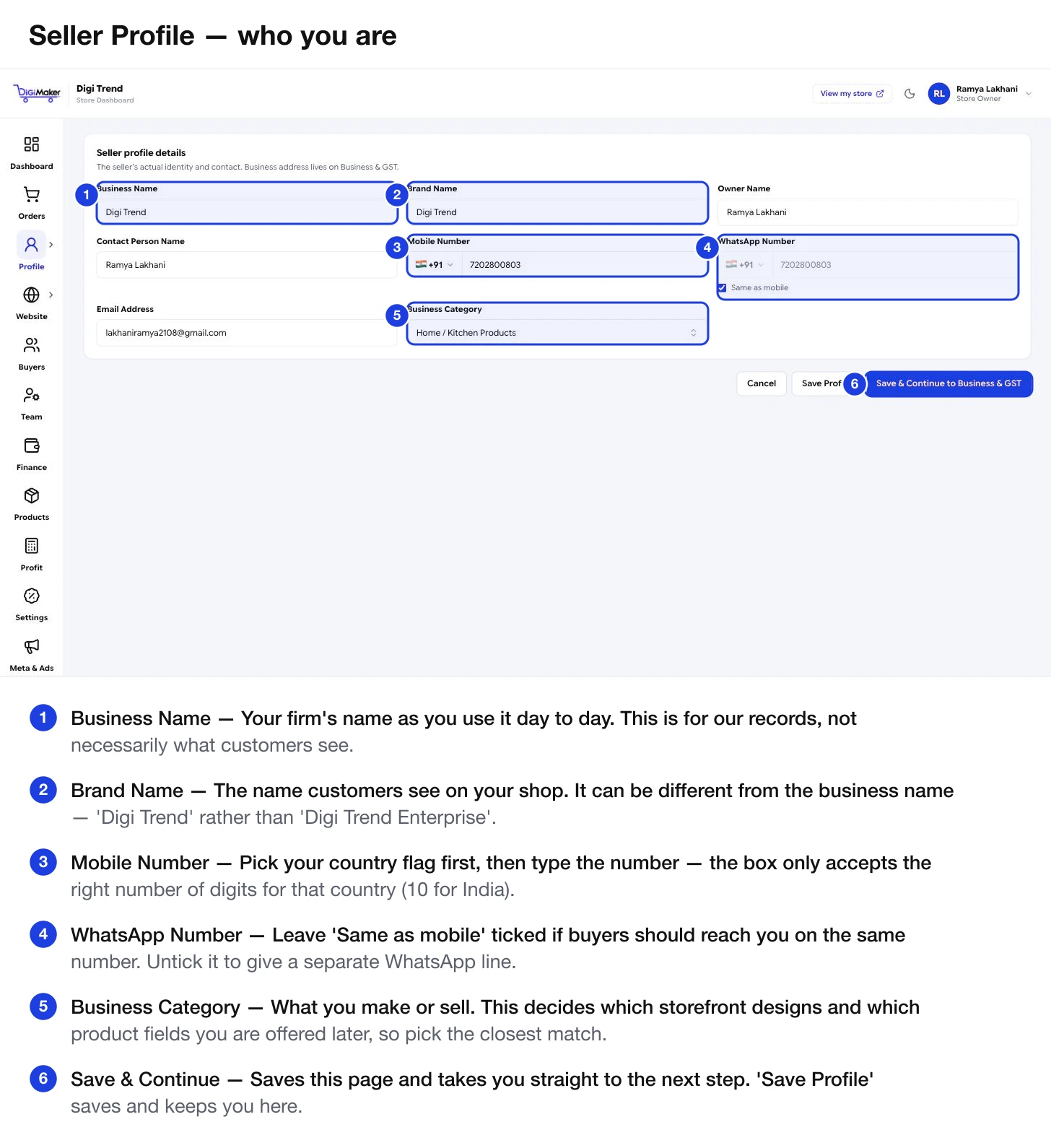
Every field
| Field | What to put in it |
|---|---|
| Business Name | Your firm’s name as you use it day to day. This is for our records. |
| Brand Name | What customers see on your shop. It can differ from the business name — “Digi Trend” rather than “Digi Trend Enterprise”. |
| Owner Name | The person who owns the business. |
| Contact Person Name | Who we should speak to. Often the same as the owner; put a manager here if they handle day-to-day. |
| Mobile Number | Your main number. Pick the country flag first — the box then only accepts that country’s digit count. |
| WhatsApp Number | Leave Same as mobile ticked unless you have a separate WhatsApp line. |
| Email Address | Where account emails go. This is also your login username. |
| Business Category | What you make or sell. Choose the closest match — this drives your template options and product fields. |
About the phone fields
Every phone box on DiGiMaker works the same way: a flag and country code on the left, the number on the right.
- Change the country and the allowed length changes with it — India accepts 10 digits, UAE 9, the US 10.
- Do not type the country code into the number box. Pick it from the flag dropdown instead.
- The number is stored in full international form, so it works for WhatsApp links and courier calls without you formatting anything.
Why Business Category matters more than it looks
It is a single dropdown, but it quietly decides three things:
- Which storefront templates you are shown. A kitchenware seller is offered Copperleaf; a jeweller is offered Zevar. See Themes & templates.
- Which product attributes appear in step 3 of the product form. A cookware category gets Dishwasher Safe and Capacity; apparel gets different ones.
- Wording across the storefront, including some default copy.
Saving
Two buttons at the bottom:
- Save Profile — saves and keeps you on this page.
- Save & Continue to Business & GST — saves and moves you to the next step, which is the usual thing to press the first time through.