

Your Business
Bank & payment details
The bank account your payouts land in, connecting Razorpay, your COD collection setup and settlement cycle, and the refund and cancellation rules that drive your storefront.
This is where your money goes. Take the extra minute on the account number — it is asked for twice on purpose.
Where to find it: menu → Profile → Bank & Payment Details.
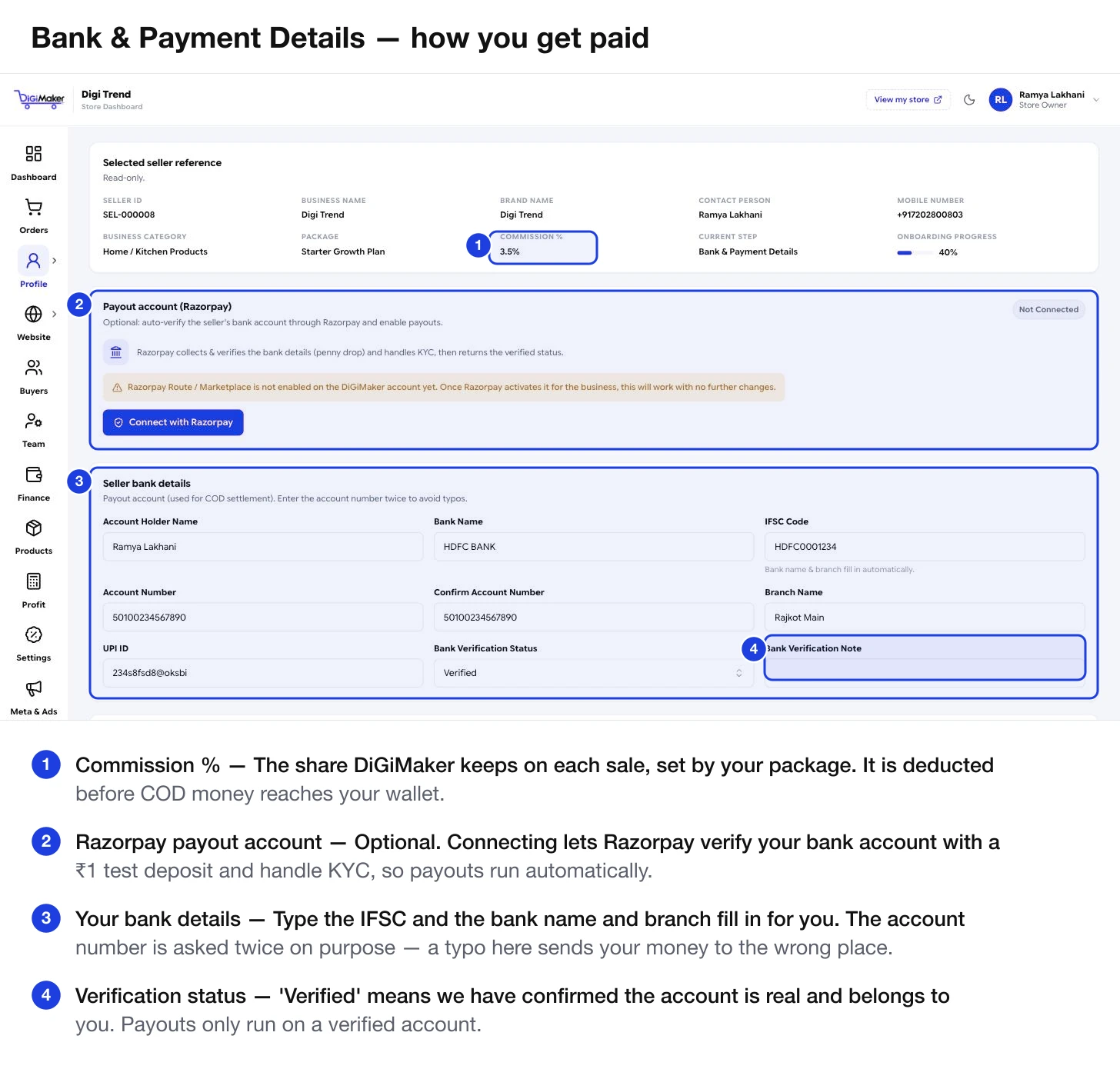
Your commission rate
The reference strip shows your Package and your Commission %. That percentage comes from the package you bought and is what DiGiMaker keeps on each sale.
Connecting Razorpay (optional)
Razorpay can verify your bank account automatically with a small test deposit — a “penny drop” — and handle the KYC paperwork, then report the verified status back to us.
Your bank details
| Field | What to put in it |
|---|---|
| Account Holder Name | Exactly as the bank has it. A mismatch here fails a transfer. |
| Bank Name | Fills in automatically once you type the IFSC. |
| IFSC Code | Type this first — bank name and branch fill in from it. |
| Account Number | Your payout account. |
| Confirm Account Number | Type it again. A single wrong digit sends your money to a stranger. |
| Branch Name | Fills in from the IFSC. |
| UPI ID | Optional, useful for small or fast settlements. |
| Bank Verification Status | Moves to Verified once we have confirmed the account is real and yours. |
| Bank Verification Note | Any note from our team if verification needed a second look. |
Online payment setup
Online Payment Enable controls whether the seller’s own payment gateway is used, so online payments go straight to your account. Leave it off until your Razorpay account is ready — a checkout that offers a payment method that then fails costs you the sale.
COD payment setup
Cash on Delivery works differently from online payments, and this section is where you shape it.
| Setting | What it does |
|---|---|
| COD Enable | Whether you accept cash on delivery at all. Most Indian sellers should keep this on. |
| COD Collection Account | Where COD cash is collected — normally the DiGiMaker account. |
| COD Collection Partner | Who processes it, typically Razorpay. |
| COD Charge Type | Fixed amount or a percentage — an extra fee you can pass to COD buyers. |
| COD Charge (₹) | The amount, if you charge one. |
| Minimum / Maximum COD Order Value | Guard rails. A maximum protects you from a ₹20,000 COD parcel that comes back undelivered. |
| COD Pincode Rule | Which pincodes you accept COD for — all serviceable ones, or a narrower list. |
| COD Settlement Cycle | How often COD money is settled to you. Daily is common. |
| COD Setup Status | Whether COD is live on your shop. |
Refund & cancellation rules
These feed both your storefront policy pages and how the order flow behaves.
- Refund Allowed — whether you refund at all.
- Cancellation Allowed — whether a buyer can cancel after ordering.
- Refund Processing Days — how long you take. Be honest; buyers hold you to it.
- Return Shipping Charge Rule — who pays the courier when something comes back.
- Online Refund Handled By — who processes refunds on prepaid orders.
- COD Refund Handled By — who processes them on cash orders, which is the fiddlier case.