

Orders & Shipping
Rate calculator
Compare live courier prices before you dispatch — pickup and drop pincodes, weight and box size, chargeable weight, and forward versus return shipments.
Before you ship anything unusual — heavy, bulky, or going somewhere far — check what it will actually cost. This screen puts every courier’s price side by side.
Where to find it: menu → Shipping → Rate Calculator.
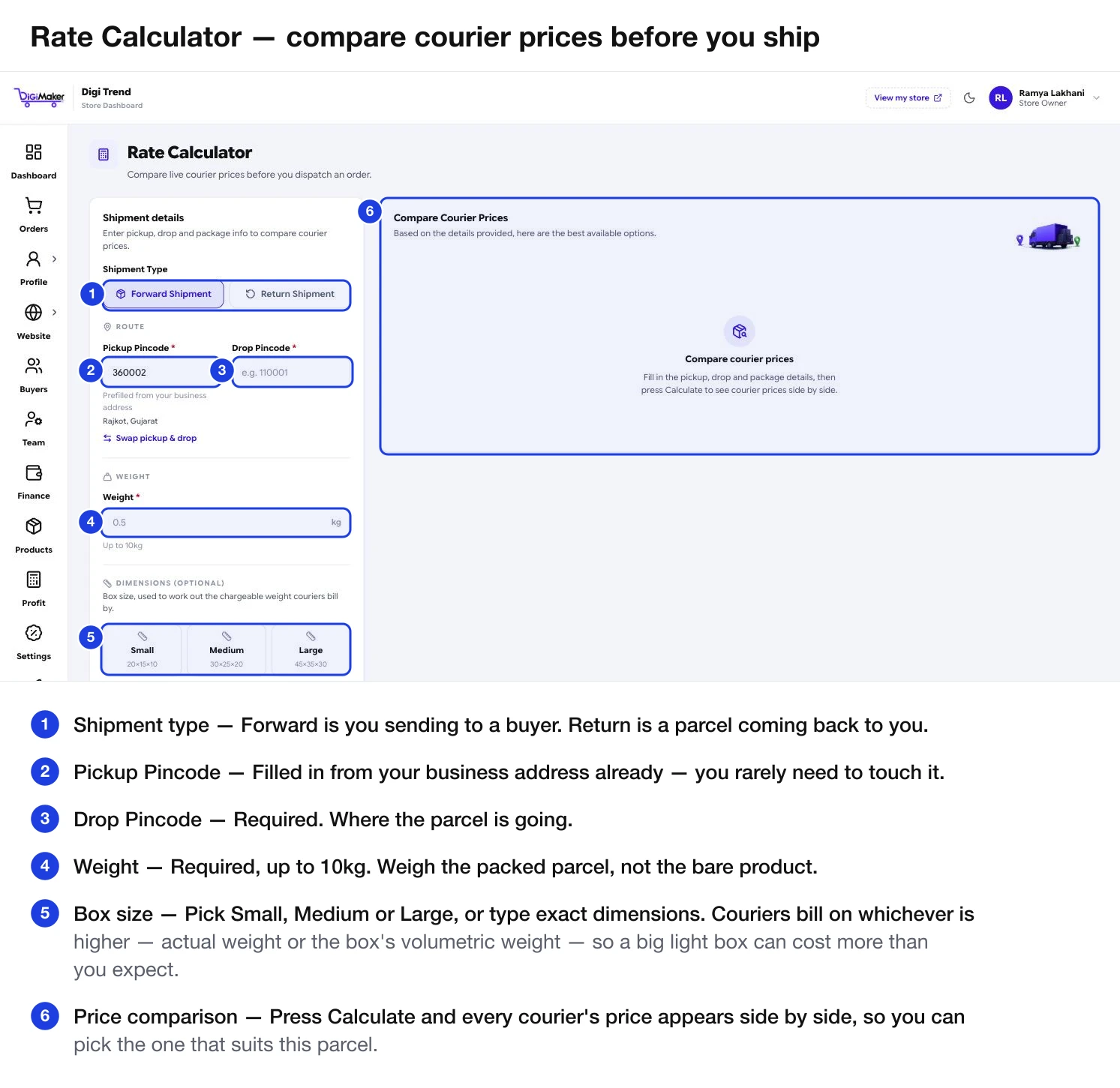
Filling it in
| Field | What to put in it |
|---|---|
| Shipment Type | Forward — you to a buyer. Return — a parcel coming back to you. |
| Pickup Pincode | Pre-filled from your business address. You rarely need to touch it. |
| Drop Pincode | Required. Where the parcel is going. |
| Swap pickup & drop | Flips the two — handy for checking a return leg. |
| Weight | Required, up to 10kg. Weigh the packed parcel, not the bare product. |
| Box size | Small (20×15×10), Medium (30×25×20), Large (45×35×30), or type exact length, breadth and height. |
| Payment Mode | Cash on Delivery or Prepaid. COD carries a collection fee, so this changes the price. |
| Invoice Value | The item’s selling price. Improves the COD charge estimate. |
Then press Calculate.
The parcel preview
As you type dimensions, the panel shows three numbers:
- Volume — the box’s volumetric weight.
- Actual — what you entered.
- Chargeable — the larger of the two. This is what you are billed on.
Reading the results
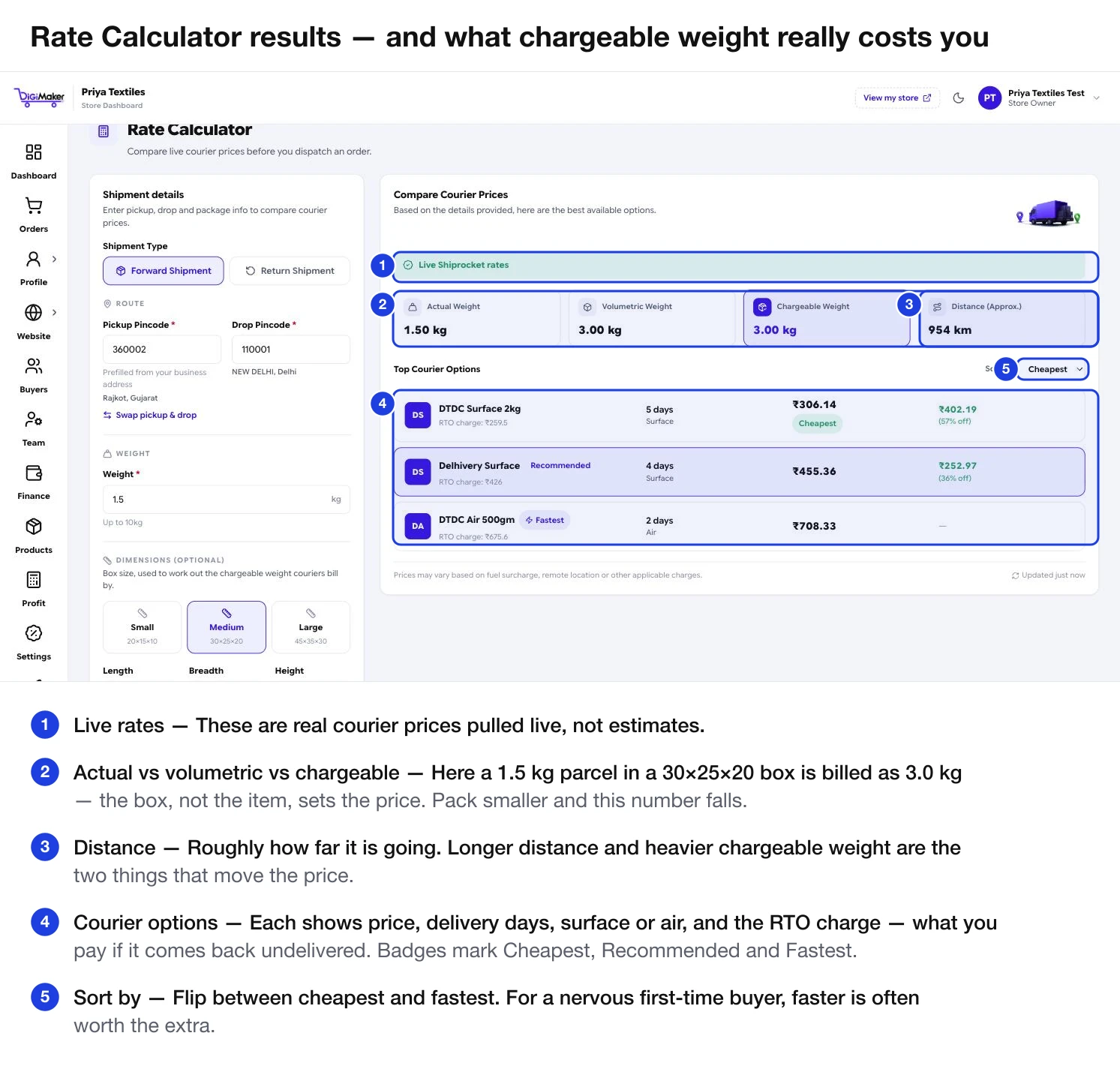
The four cards across the top are the whole lesson in one line: actual weight 1.5 kg, volumetric weight 3.0 kg, chargeable weight 3.0 kg. The box — not the item — set the price. Pack smaller and that number falls.
Each courier option shows:
- Price and any discount off the list rate
- Delivery days and whether it is Surface or Air
- RTO charge — what you pay if the parcel comes back undelivered
- Badges for Cheapest, Recommended and Fastest
Sort by flips between cheapest and fastest.
Which one to pick
Cheapest at the top is not automatically the right answer:
Take the cheapest that reaches the pincode. The delivery cost is a real slice of your margin on a ₹500 order.
Pay more for a courier with a better record. One damaged ₹5,000 parcel wipes out the saving on twenty cheap shipments.
Check which partners serve it at all. A cheap courier that cannot reach the address is not cheap — it is an RTO.
Set Payment Mode to Cash on Delivery so the collection fee is included. Prepaid prices understate what a COD parcel actually costs you.
Using it to price your delivery charge
Run three or four realistic parcels — your typical product to a nearby city, and to somewhere far. The spread tells you what a sensible flat delivery charge is in Delivery charges & GST, and where to set your free shipping over threshold so it does not cost you money.
Feed the same number into the Shipping Cost / order field in the Profit calculator — there is a direct link between the two screens.
Return rates
The Return Rates screen next to this one shows every return courier connected to your Shiprocket account, compared across distance zones, with no pincode to type. It exists because a return leg is often priced differently from the outbound one — and returns are a cost most sellers forget to budget for.