

Money
Profit calculator
Work out your real weekly profit and per-product margin before you scale ad spend — every input explained, including the cancelled and RTO orders sellers forget to count.
Revenue is not profit. This screen is where you find out what is actually left after product cost, shipping, ads, packaging, and the orders that never made it.
Where to find it: menu → Profit.
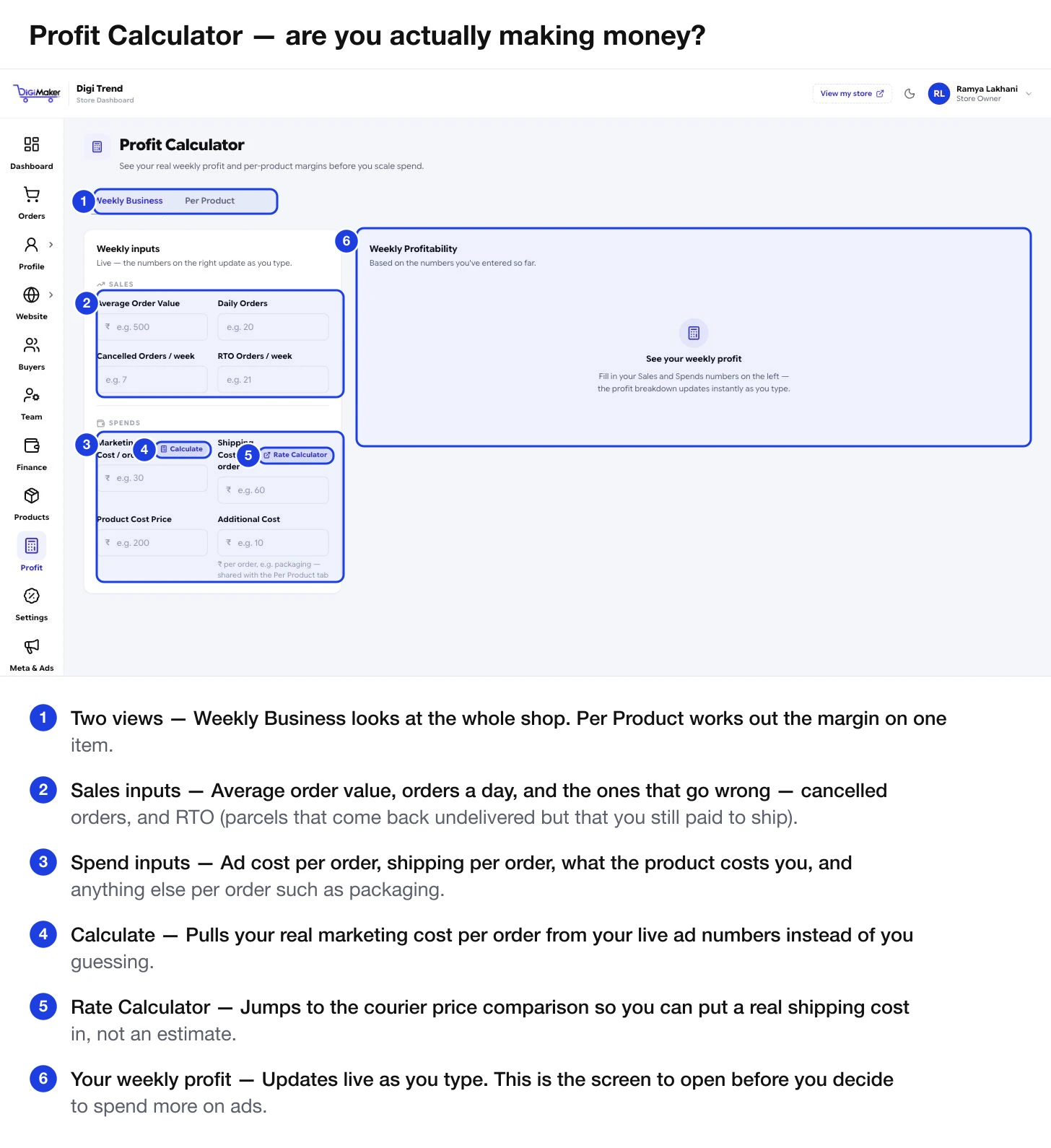
Two views
- Weekly Business — the whole shop over a week. Use this before any decision about ad budget.
- Per Product — the margin on one item. Use this when pricing something new or wondering whether a product is worth keeping.
Per Product — the margin on one item
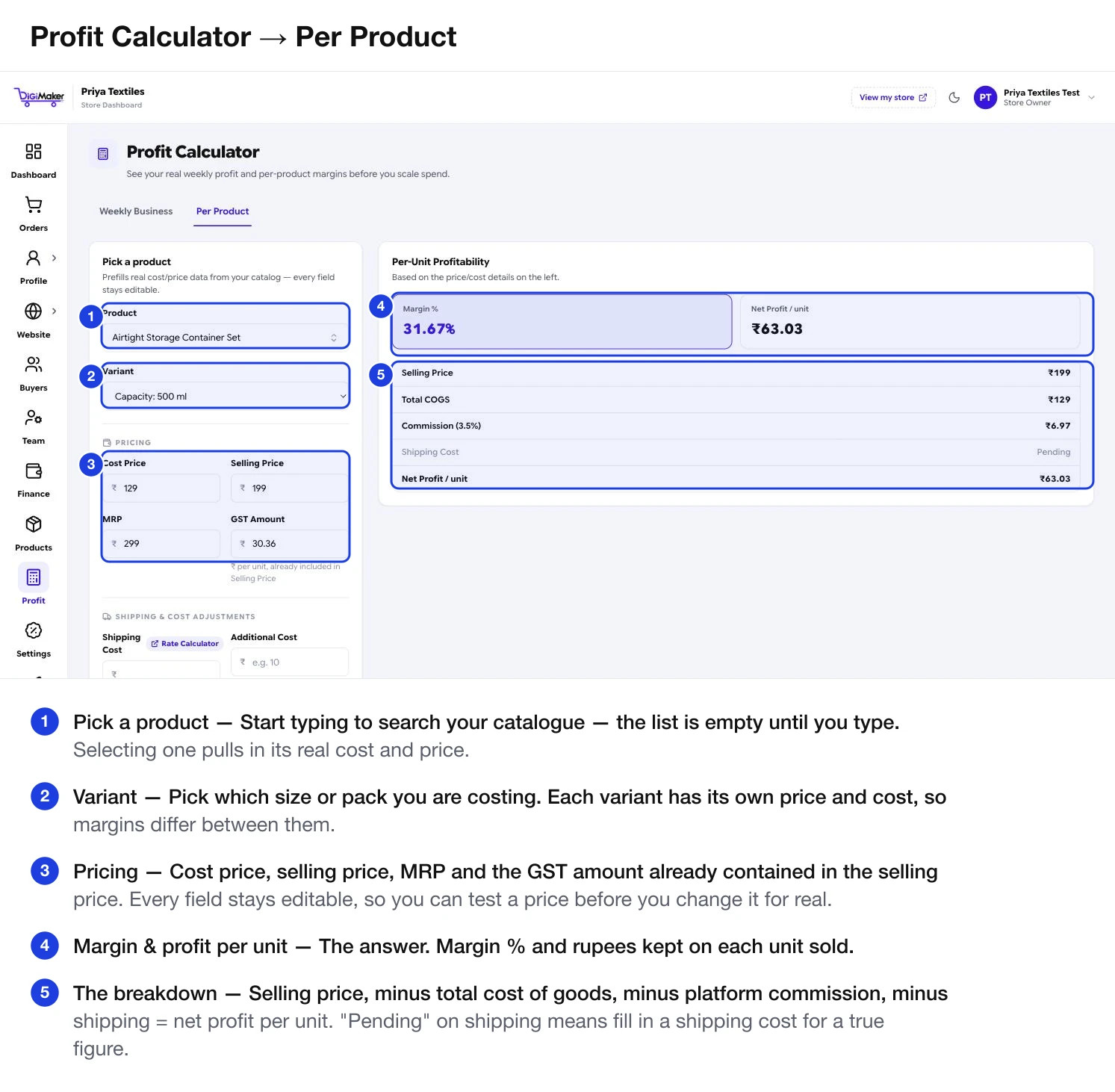
Pick a product, then a variant — each size or pack has its own price and cost, so margins differ between them. The pricing fields fill in from your catalogue and stay editable, so you can test a new price before changing it for real.
The right-hand panel gives you Margin % and Net profit per unit, then the breakdown:
Selling price− Total COGS− Platform commission− Shipping cost──────────────────────= Net profit / unitThere is also an Include RTO risk switch, which subtracts an expected return-shipping loss worked out from your RTO orders per week — the honest version if you sell a lot on COD.
Sales inputs
| Field | What to enter |
|---|---|
| Average Order Value | What a typical order is worth. It is on your dashboard and in Website analysis. |
| Daily Orders | Roughly how many a day. |
| Cancelled Orders / week | Orders that were cancelled. |
| RTO Orders / week | Parcels that came back undelivered. |
Spend inputs
| Field | What to enter |
|---|---|
| Marketing Cost / order | What you pay in ads per order. Press Calculate beside it to pull your real number from your live ad data instead of guessing. |
| Shipping Cost / order | What the courier costs you. Rate Calculator beside it jumps to the price comparison so you can use a real figure. |
| Product Cost Price | What the goods cost you to make or buy. This is the Cost Price field from step 2 of the product form. |
| Additional Cost | Anything else per order — packaging, tape, labels, the person who packs. |
Reading the result
The right-hand panel breaks down your weekly profitability live as you type — what came in, what went out, and what is left.
Work down in this order: is your RTO rate high (see Returns, NDR & RTO)? Is marketing cost per order above your margin? Is shipping cost above what you charge for delivery? Is the product priced too close to its cost?
Raise the free-shipping threshold to lift average order value, cut RTO by shifting buyers to online payment, or pack smaller to cut chargeable weight. Small changes compound.
Now the ad-spend conversation is worth having. Compare cost per order here against the figure on your dashboard — if ads bring an order for less than your profit per order, spending more makes sense.
When to open this screen
- Before agreeing an ad budget. Always. This is the number that decides it.
- When pricing a new product. Per Product tab, before you publish it.
- After changing your delivery charge or free-shipping threshold.
- Monthly, as a habit, with real numbers from the last four weeks.