

Getting Started
How DiGiMaker works
The whole picture in one page — who does what, where your money goes, and which parts you run yourself versus which parts the DiGiMaker team does for you.
Before you touch a single screen, it helps to know the shape of the thing. DiGiMaker is partly software you run and partly a team that works alongside you — and knowing which is which saves a lot of confusion.
Who does what
This is the single most useful table in the documentation. Sellers often waste an evening trying to do something we were always going to do for them.
| You do it | DiGiMaker does it | |
|---|---|---|
| Your business & GST details | ✅ | |
| Bank account for payouts | ✅ | |
| Choosing your storefront design | ✅ | We can advise |
| Building the actual website | ✅ (or we do) | ✅ Our design team builds it if you’d rather |
| Products, prices, photos, stock | ✅ | |
| Pointing your own domain | You change the nameservers | ✅ We give you the values and walk you through it |
| Accepting & packing orders | ✅ | |
| Courier pickup & tracking | ✅ Built in | |
| Collecting COD cash | ✅ We collect and remit | |
| Running Facebook / Instagram ads | ✅ Our marketing team runs them | |
| Support when something breaks | ✅ |
The seller journey, end to end
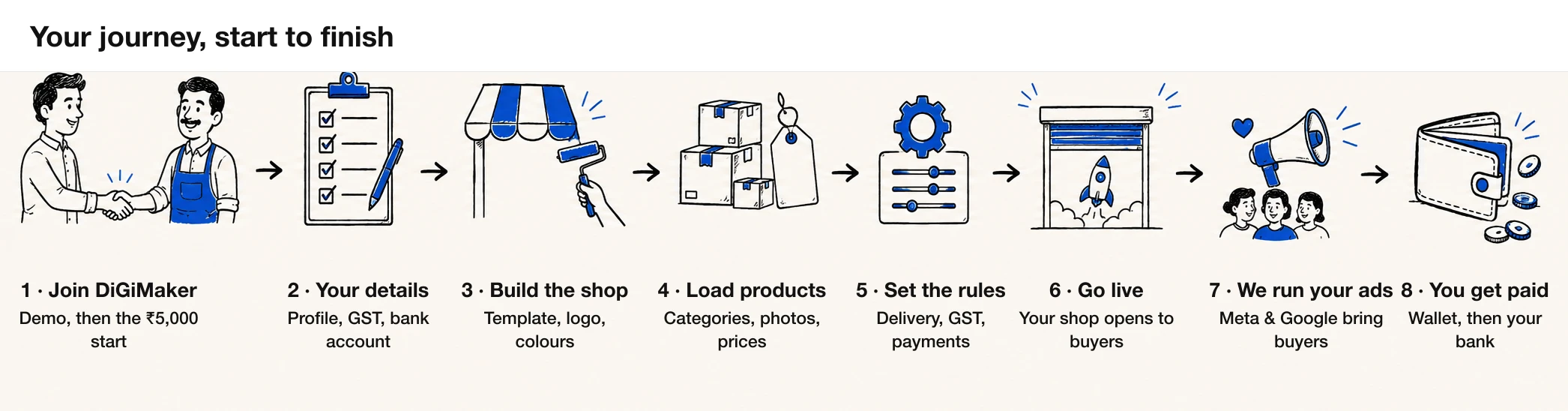
You join
After a demo, an initial payment of ₹5,000 starts things. We create your login and your store’s free address on digimaker.in.
You fill in who you are
Seller profile, business & GST details, and the bank account your money should land in. This is the slowest part and it is worth doing carefully — see Seller profile.
Your website gets built
Pick a template, set your logo and colours, write your banner. Our design team can do this with you or for you. See Building your storefront.
You load your products
Categories first, then products — one at a time through the 4-step form, or all at once from a spreadsheet. See Adding products.
You set the shop's rules
Delivery charge, GST handling, which payment methods you accept, where couriers collect from. See Store settings.
You go live
Your shop is public at yourname.digimaker.in. If you own a domain, we point it at your shop next. See Going live.
Buyers arrive and orders come in
Some find you directly; most come from the ads our marketing team runs for you. Orders land in your Orders screen. See Managing orders.
Money reaches you
Online payments go straight to your account; COD cash comes to us first, we take our commission, and the rest lands in your wallet. See Wallet & commission.
Where the money actually goes
This trips up nearly every new seller, so it is worth being exact. There are two completely different paths depending on how the buyer paid.
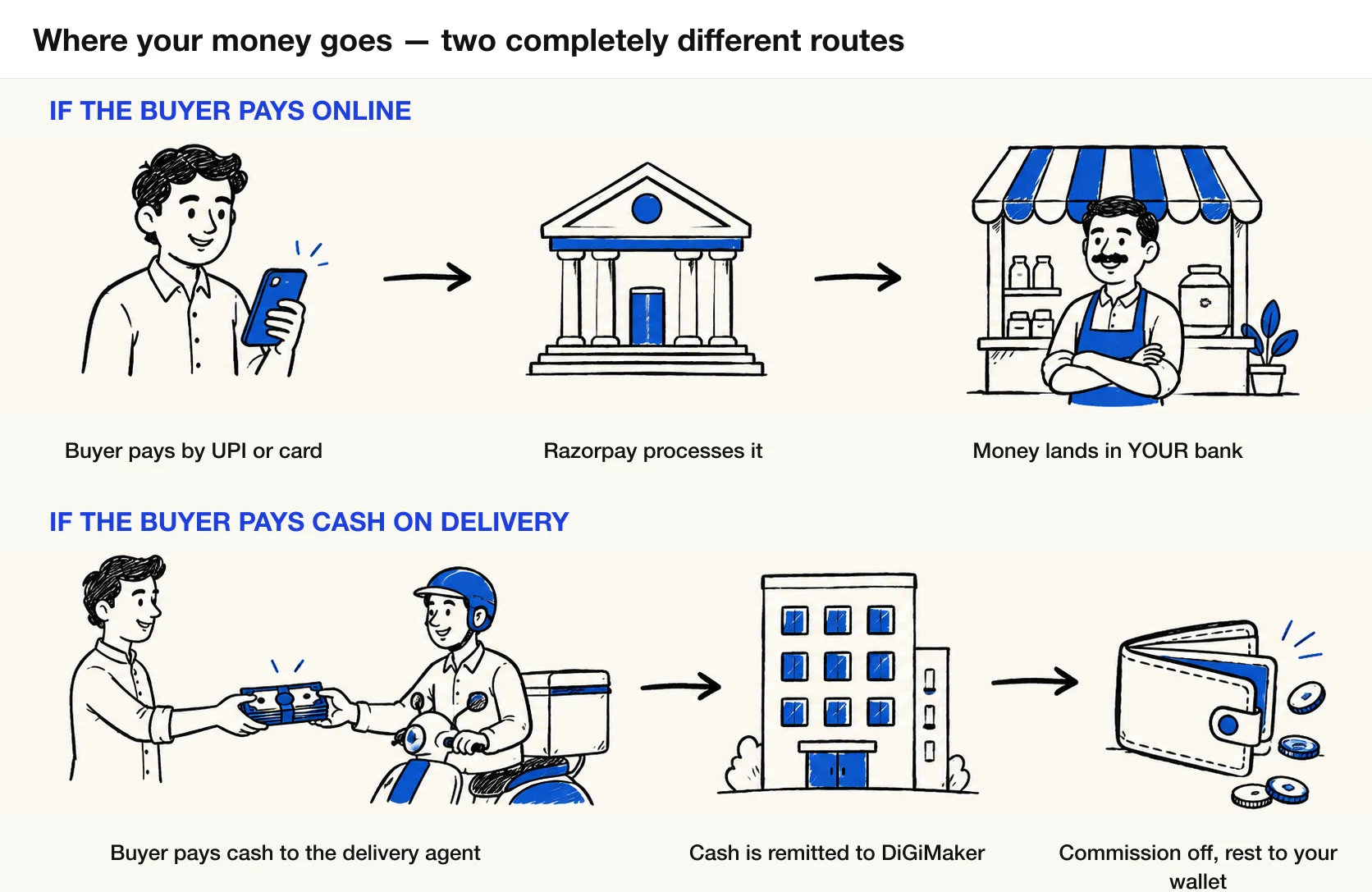
| Buyer pays online (UPI / card / netbanking) | Buyer pays Cash on Delivery | |
|---|---|---|
| Who takes the money | Razorpay, into your account | The delivery agent, in cash |
| Where it sits first | Your bank account | With DiGiMaker |
| How our commission is taken | Deducted from your wallet afterwards | Deducted before the rest reaches you |
| What you see in the wallet | A deduction | A credit — the order value minus commission |
| Typical timing | Razorpay’s own settlement cycle | Your COD settlement cycle (often daily) |
What you can and cannot change yourself
Products, prices, stock, photos, categories, coupons, your announcement bar, delivery charge, which payment methods are on, your pickup addresses, your staff and what they can see.
Your custom domain (you change the nameservers, we supply them), your Razorpay account, and your Meta ad account connection.
Hosting, security, courier integration, COD cash collection and remittance, ad campaigns, and the commission calculation itself. Your commission percentage comes from the package you bought and is shown on your Bank & Payment Details screen.
Your Seller ID, and the GST-derived PAN on your business record. These are identity fields — if one is genuinely wrong, tell your onboarding contact rather than working around it.