

Store Settings
Coupons
Discount codes buyers enter at checkout — percentage or flat, with minimum cart values, caps, expiry dates and per-buyer limits.
A coupon is a code a buyer types at checkout to get money off. Every field on the form exists to stop a good offer becoming an expensive one.
Where to find it: menu → Settings → Coupons → Add coupon.
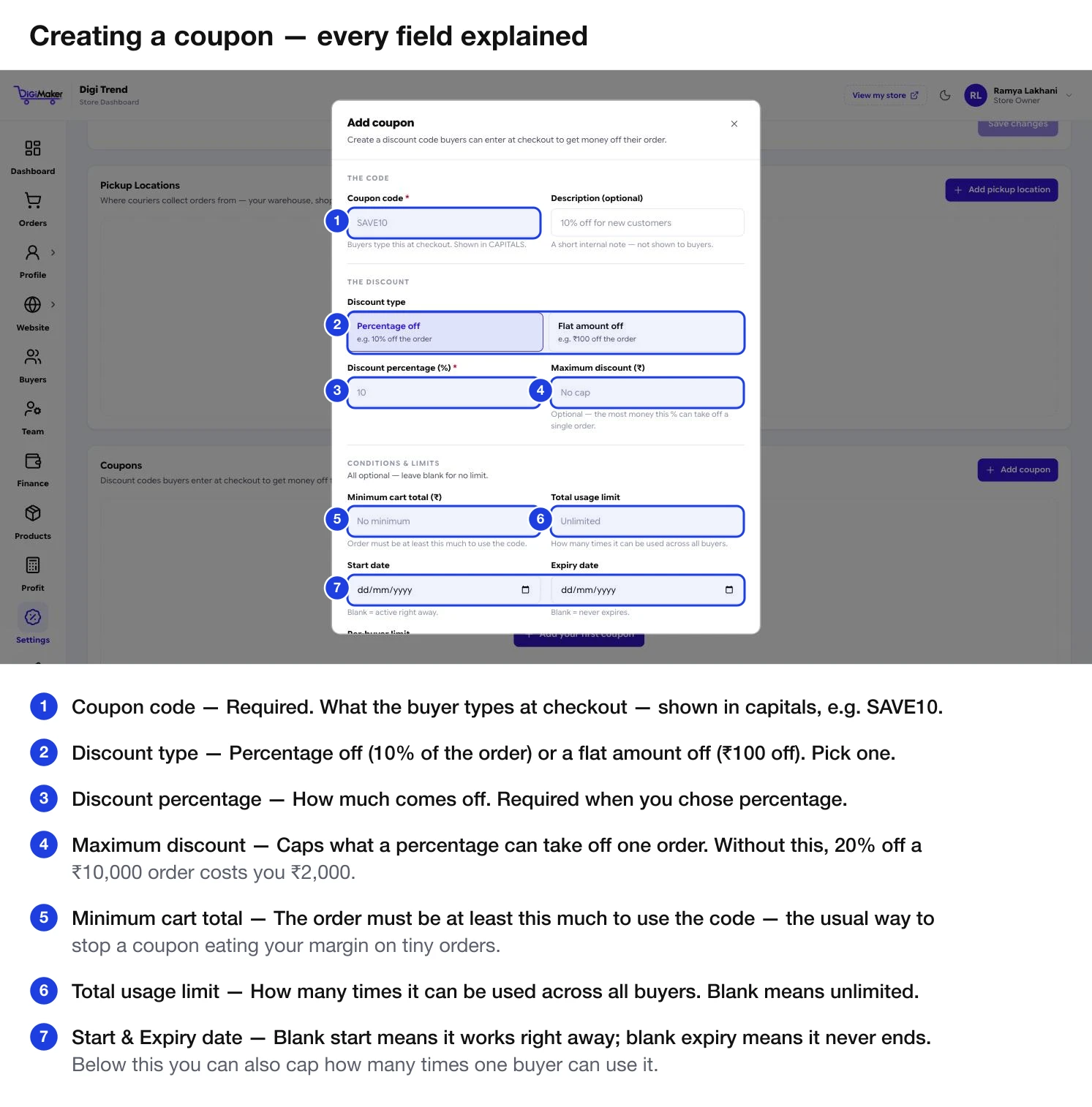
Every field
| Field | What it does |
|---|---|
| Coupon code | Required. What the buyer types. Shown in capitals — SAVE10, DIWALI25. |
| Description | An internal note for you. Never shown to buyers. |
| Discount type | Percentage off (10% of the order) or Flat amount off (₹100 off). |
| Discount percentage / amount | How much comes off. Required. |
| Maximum discount (₹) | Caps what a percentage can take off one order. |
| Minimum cart total (₹) | The order must be at least this much for the code to work. |
| Total usage limit | How many times it can be used across all buyers. Blank = unlimited. |
| Start date | Blank means it works right away. |
| Expiry date | Blank means it never ends. |
| Per-buyer limit | How many times one person can use it. |
| Active | Only active coupons work at checkout. |
The two fields that save you money
Coupons that work
10% off, minimum cart ₹999, capped at ₹200, one use per buyer, no expiry. Put the code in your announcement bar. It converts first-time visitors who are hesitating.
A flat amount off with a start and end date, set up in advance so you do not have to be at a computer on the day. Total usage limit if you want to cap the exposure.
A generous code with a tight per-buyer limit, sent by WhatsApp to people in your Buyers list who have not ordered in a while.
Percentage off with a high minimum cart total. Rewards the orders you actually want without discounting your small ones.
Turning one off
Switch Active off rather than deleting the coupon. The code stops working immediately, and you keep the record of what you ran — useful when you want to repeat it next season.
Coupons and payment discounts stack
A coupon is separate from the payment-linked discounts. A buyer can use both — a 10% coupon and 5% for paying online. Work out what that combination does to your margin in the Profit calculator before running an aggressive coupon.